spot_img
Thursday, November 26, 2026
Home Blog Page 715

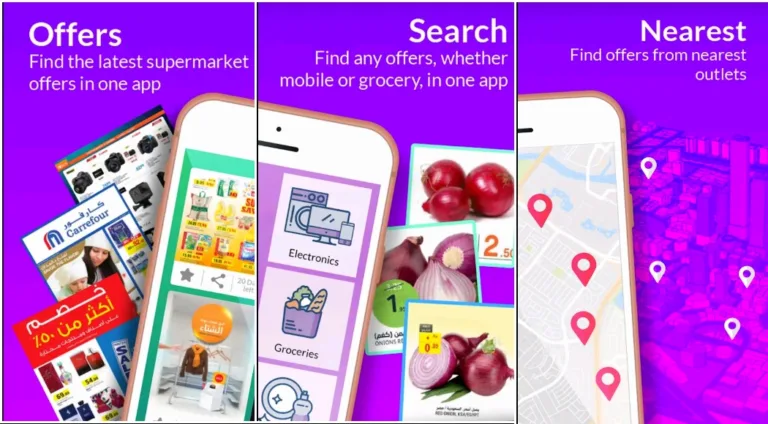
ഗൾഫിലെ ഏത് രാജ്യത്തെയും ഹൈപ്പർമാർക്കറ്റ്, സൂപ്പർമാർക്കറ്റ് ഓഫറുകൾ ഈ ആപ്പിലൂടെ അറിയാം

0

ഗൾഫിലെ ഏത് രാജ്യത്തെയും ഹൈപ്പർമാർക്കറ്റ്, സൂപ്പർമാർക്കറ്റ് ഓഫറുകൾ ഈ ആപ്പിലൂടെ അറിയാംസൗദി, കുവൈറ്റ്, UAE, ഖത്തർ, ബഹ്‌റൈൻ തുടങ്ങിയ രാജ്യങ്ങളിലെ മികച്ച ഷോപ്പിംഗ് ഡീലുകളും ഓഫറുകളും അറിയാം

Latest Shopping Offers, Deals, Exchange Rates, Gold Rates, Price ComparisonsFind all the latest shopping offers, deals, and notifications in your area! Find supermarket/hypermarket booklets & offers in one app. Get updated exchange rate in one app: use D4D For currency conversion, use online D4D For daily Gold Prices, use D4D online Get Restaurant menu, use D4D online More than 1.5 million+ users in D4D app Save all your Loyalty card in D4D app To Save Money & Time, use D4D appPerfect app for people living in Saudi Arabia, Kuwait, United Arab Emirates, Qatar, Bahrain and Egypt

*Support multi language English Arabic French Filipino Urdu Hindi Malayalam Telugu Nepali Bengali

I PHONE ➡️ Click Here

Android ➡️ Click Here

ആകർഷകമായ ഓഫറുമായി ജിയോ ; ഫാമിലി പോസ്റ്റ്‌പെയ്ഡ് പ്ലാനുകൾ അവതരിപ്പിച്ചു

0

പുതിയ ഫാമിലി പോസ്റ്റ്‌പെയ്ഡ് പ്ലാനുകൾ അവതരിപ്പിച്ച് റിലയൻസ് ജിയോ.ജിയോ പ്ലസ് സ്കീമിന് കീഴിലാണ് പുതിയ പ്ലാനുകൾ അവതരിപ്പിച്ചിരിക്കുന്നത്.  പോസ്റ്റ്‌പെയ്ഡ് പ്ലാനിനൊപ്പം സൗജന്യ നെറ്റ്ഫ്ലിക്സ്, ആമസോൺ പ്രൈം സബ്‌സ്‌ക്രിപ്‌ഷനുകളും ജിയോ വാഗ്ദാനം ചെയ്യുന്നുണ്ട്. 

ചില പ്ലാനുകളിൽ അൺലിമിറ്റഡ് വോയ്‌സ്, എസ്എംഎസ്, മറ്റ് ആനുകൂല്യങ്ങളും ഉൾപ്പെടുന്നുണ്ട്. പ്ലാൻ പരീക്ഷിക്കുന്നതിന് ടെലികോം കമ്പനി കുടുംബത്തിലെ നാല് അംഗങ്ങൾക്ക് വരെ ഒരു മാസത്തെ സൗജന്യ ട്രയൽ ലഭ്യമാക്കും. കമ്പനി നൽകിയ വിശദാംശങ്ങൾ അനുസരിച്ച് മാർച്ച് 22 മുതൽ പുതിയ ജിയോ പ്ലസ് പ്ലാനുകൾ ലഭ്യമാകും.

70000 70000 എന്ന നമ്പറിൽ ഒരു മിസ്‌ഡ് കോൾ നൽകിയാൽ മതി. സിം വീട്ടിലെത്താൻ. വാട്ട്‌സ്ആപ്പിൽ വരുന്ന മെസെജിന് റിപ്ലെ നല്കുക. സെക്യൂരിറ്റി ഡെപ്പോസിറ്റ് എഴുതിത്തള്ളുന്നതിനായി ഒരു ഓപ്ഷൻ തിരഞ്ഞെടുക്കാൻ ഉപഭോക്താക്കളോട് ആവശ്യപ്പെടും. കൂടാതെ പോസ്റ്റ്‌പെയ്ഡ് സിമ്മിനായി ആളുകൾക്ക് സൗജന്യ ഹോം ഡെലിവറി ഓപ്ഷനും സെലക്ട് ചെയ്യാം. ഹോം ഡെലിവറി സമയത്ത്, ഒരാൾക്ക് മൂന്ന് ഫാമിലി സിമ്മുകൾ കൂടി വാങ്ങാനാകും. ആക്ടിവേഷൻ സമയത്ത് ഒരു സിമ്മിന് 99 രൂപ നൽകേണ്ടിവരും. 

മാസ്റ്റർ ഫാമിലി സിം ആക്ടിവേറ്റ് ചെയ്തുകഴിഞ്ഞാൽ, മൈജിയോ ആപ്പ് ഉപയോഗിച്ച് നിങ്ങളുടെ അക്കൗണ്ടിലേക്ക് മൂന്ന് കുടുംബാംഗങ്ങളെ ലിങ്ക് ചെയ്യാനാകും. 399 രൂപയുടെ ജിയോ പോസ്റ്റ്‌പെയ്ഡ് പ്ലാനിൽ അൺലിമിറ്റഡ് വോയ്‌സ് കോളുകളും എസ്എംഎസ് ആനുകൂല്യങ്ങളും 75 ജിബി ഡാറ്റയും ഉൾപ്പെടുന്നു. 500 രൂപ സെക്യൂരിറ്റി ഡെപ്പോസിറ്റ് ചാർജും ഈടാക്കുന്നുണ്ട്. 699 രൂപയുടെ ജിയോ പോസ്റ്റ്പെയ്ഡ് പ്ലാൻ ഉപയോഗിച്ച് നെറ്റ്ഫ്ലിക്സും ആമസോൺ പ്രൈമും ഉപയോഗിക്കാം. ആളുകൾക്ക് 100 ജിബി ഡാറ്റയും അൺലിമിറ്റഡ് വോയിസും എസ്എംഎസും ഇതിനു പിന്നാലെ ലഭിക്കും. 

ഓരോ പ്ലാനിലും ഒരാൾക്ക് മൂന്ന് അംഗങ്ങളെ വരെ ചേർക്കാം. രണ്ട് പ്ലാനുകളുടെയും സൗജന്യ ട്രയൽ ലഭ്യമാണ്. രണ്ടാമത്തെ പ്ലാനിന്റെ സെക്യൂരിറ്റി ഡെപ്പോസിറ്റ് 875 രൂപയാണ്.299 രൂപയുടെ ജിയോ പ്ലാനിൽ അൺലിമിറ്റഡ് വോയ്‌സ് കോളുകൾ, 30 ജിബി മൊത്തം ഡാറ്റ, അൺലിമിറ്റഡ് എസ്എംഎസ് ആനുകൂല്യങ്ങൾ എന്നിവയുണ്ട്. ഈ പ്ലാനിന്റെ സെക്യൂരിറ്റി ഡെപ്പോസിറ്റ് 375 രൂപയാണ്. ഈ പാക്കിൽ സൗജന്യ ട്രയൽ സ്കീമൊന്നുമില്ല. 

599 രൂപയുടെ ജിയോ പ്ലാൻ അൺലിമിറ്റഡ് കോളുകളും ഡാറ്റയും എസ്എംഎസ് ആനുകൂല്യങ്ങളും ഇതിൽ ലഭ്യമാകും. ഇത് ഒരു മാസത്തെ സൗജന്യ ട്രയലിനായി ലഭ്യമാണ്. ഈ പാക്കിന്റെ സെക്യൂരിറ്റി ഡെപ്പോസിറ്റ് തുക 750 രൂപയാണ്.ജിയോ പ്രീപെയ്ഡ് ഉപയോക്താവിന് സിം മാറ്റാതെ തന്നെ പോസ്റ്റ്പെയ്ഡ് സൗജന്യ ട്രയലിലേക്ക് അപ്ഗ്രേഡ് ചെയ്യാം.

How to Link Aadhaar with PAN Card Online & Using SMS, Check Status

0

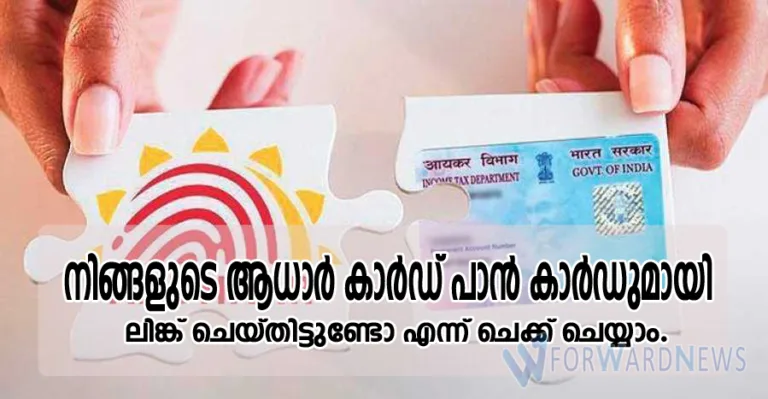
Linking Aadhar with PAN has become mandatory because your income tax return would not be processed if your Aadhar is not linked with PAN. Also, if you have to carry out a banking transaction above Rs. 50,000, you have to get your PAN and Aadhar linked.

Linking PAN card with an Aadhaar card is very simple and the government has provided various methods to do that. The deadline for linking PAN with the Aadhaar card is 30 June 2021. Know more about How to Link Aadhaar with PAN Card Online in this article.

How to Link PAN Card to Aadhaar Card Online through e-Filing Website

People can get their PAN and Aadhar linked online by following the steps mentioned below:

Step 1. Step 1. Visit the Income Tax e-Filing website and click on the ‘Link Aadhaar’ option under the quick links. Visit Now : CLICK HERE

Step 2. Enter your PAN and Aadhaar number

Step 3. Enter the name as mentioned in your Aadhaar card

Step 4. In case, if only the date of birth is mentioned on your Aadhaar card and you have to tick the square

Step 5. Tick mark ‘I agree to validate my Aadhaar details with UIDAI’

Step 6. Now, enter the ‘Captcha Code’ mentioned in the image for the verification

Step 7. You need to click on the ‘Link Aadhaar’ button

Step 8. A pop-up message will appear showing your successfully linked Aadhaar with PAN Card

How to Link Aadhaar with PAN by sending an SMS

In order to link your Aadhaar to PAN, follow these steps:

You have to type a message in the format

UIDPAN<12 Digit Aadhaar> <10 Digit PAN>

Send the message in the above-mentioned format to either 567678 or 56161 from your registered mobile number

For example, if your Aadhaar number is 987654321012 and your PAN is ABCDE1234F, you have to type UIDPAN 987654321012 ABCDE1234F and send the message to either 567678 or 56161

Correction Facility for Linking your PAN with Aadhar Card

PAN and Aadhar card linking is successful only when all your details in both documents match. In case there are errors such as spelling mistakes in your name, your PAN will not be linked with Aadhaar. You can make changes by visiting a nearby Aadhaar Enrolment Centre or through the portal of NSDL PAN. In case there are errors, you can get them corrected by following these steps:

The user can correct his PAN details using the NSDL website

The NSDL link redirects to the page where you can apply for the correction of your name

Submit signed digital documents to get your PAN details updated

Once your details are corrected in your PAN and confirmed by NSDL over a mail, you can link your PAN with Aadhaar

Unable to Link PAN with Aadhaar? Here’s What to Do

The Government of India has made it mandatory for all individuals to link PAN card with Aadhaar card before the deadline (i.e.30th June 2021) as failure to link the both will lead to deactivation of PAN by the Income Tax Department and you will not be to file Income Tax Returns, etc.

Moreover, make sure your name should be the same on both the PAN card and the Aadhaar card. In case there is some spelling mismatch, you will be unable to link Aadhaar with PAN. You will have to get your name corrected and after correction, you will be able to easily link your PAN with Aadhaar.

In case your name in the PAN card is wrongly spelt, follow these steps to make corrections:

Step 1: Visit the e-filing website of NSDL at CLICK HERE

Step 2: Select the ‘Changes or Correction in existing PAN data/Reprint of PAN Card (No changes in Existing PAN Data)’ option from the drop-down menu

Step 3: Select the individual category and enter your details

Step 4: Make payment and submit your form online after Aadhaar e-KYC

Step 5: Your updated PAN will be sent to your address

Step 6: Once you receive your PAN card, you can link your PAN with Aadhaar

In case your name in the Aadhaar card is wrongly spelt, follow these steps to make corrections:

Step 1: Visit an Aadhaar Enrolment Centre

Step 2: Carry a self-attested copy of your proof of Identity

Step 3: Fill the Aadhaar Enrolment Form

Step 4: Submit the form along with the documents

Step 5: You will get an acknowledgement slip that contains the update request number

Step 6: This URN can be used to check the status of your update request

Step 7: Once your update request is processed and the name is corrected, you can link your PAN with Aadhaar

Importance of Linking PAN Card with Aadhar Card

Linking PAN with Aadhar is very important for all PAN cardholders because of the following reasons:

All PAN cards that are not linked with Aadhaar will be deactivated after June 30th, 2021

Linking PAN with Aadhaar will help in tackling the problem of multiple PAN cards issued in the same name

Your income tax return form would not be processed if your PAN is not linked with Aadhaar

The user will get a summarised detail of taxes levied on him for future reference

How to Check if my PAN Card is Linked with Aadhaar Card or not

To check PAN-Aadhaar link status, follow the steps mentioned below:

Step 1: Visit the e-Filing Income Tax Department page i.e. CLICK HERE

Step 2. Enter your PAN Number

Step 3: Enter your Aadhaar Number

Step 4: Now, click on the ‘View Link Aadhaar Status’ button

Step 5: You Aadhaar-PAN link status will appear on your screen

Link Aadhaar with PAN Card: CLICK HERE

യൂട്യൂബില്‍ ഇനി ഈ രീതിയില്‍ പരസ്യം കാണിക്കില്ല, പകരം മറ്റ് വഴികള്‍

0

വീഡിയോകളില്‍ ചില പരസ്യങ്ങള്‍ കാണിക്കുന്ന രീതിയില്‍ യൂട്യൂബ് മാറ്റം കൊണ്ടുവരുന്നു. ഏപ്രില്‍ ആറ് മുതല്‍ വീഡിയോകളില്‍ കാണിച്ചിരുന്ന ‘ ഓവര്‍ലേ ആഡുകള്‍’ യൂട്യൂബ് ഒഴിവാക്കും. വീഡിയോകള്‍ക്ക് മുകളില്‍ ബാനര്‍ പോലെ കാണിച്ചിരുന്ന പരസ്യങ്ങളാണ് ഓവര്‍ ലേ ആഡുകള്‍.കാലങ്ങളായി പിന്തുടര്‍ന്നുവരുന്ന ഈ പരസ്യ പ്രദര്‍ശന രീതി കാഴ്ചക്കാര്‍ക്ക് തടസം സൃഷ്ടിക്കുന്നുണ്ടെന്ന നിരീക്ഷണത്തെ തുടര്‍ന്നാണ് മാറ്റം. മൊബൈല്‍ ഫോണ്‍ പതിപ്പില്‍ നിന്ന് നേരത്തെ തന്നെ ബാനര്‍ പരസ്യങ്ങള്‍ ഒഴിവാക്കിയിരുന്നു. പകരം വീഡിയോകളുടെ തുടക്കത്തിലും ഇടയ്ക്കും വീഡിയോയുടെ അവസാനവും കാണിക്കുന്ന പരസ്യങ്ങള്‍ മാത്രമാക്കി മാറ്റി. ചില വീഡിയോകള്‍ മുഴുവന്‍ കാണേണ്ടവയും ചിലത് സ്‌കിപ്പ് ചെയ്യാന്‍ സാധിക്കുന്നവയും ആണ്

അതേസമയം, ഈ നീക്കം യൂട്യബ് ക്രിയേറ്റര്‍മാരെ കാര്യമായി ബാധിക്കില്ലെന്ന് കമ്പനി പറഞ്ഞു. എന്നാല്‍ ഓവര്‍ലേ ആഡുകള്‍ക്ക് പകരം മറ്റ് രീതികളിലേക്ക് മാറുമെന്ന് കമ്പനി പറഞ്ഞു. എന്നാല്‍ അവ എന്തെല്ലാമാണെന്ന് വ്യക്തമാക്കിയില്ല.എന്തായാലും, 2023 ഏപ്രില്‍ ആറ് മുതല്‍ ഓവര്‍ ലേ ആഡുകള്‍ വീഡിയോകളില്‍ ചേര്‍ക്കാന്‍ ക്രിയേറ്റര്‍മാര്‍ക്ക് സാധിക്കില്ല

Best Application for Voice to Text Conversion

0

Live Transcribe & Sound Notifications makes everyday conversations and surrounding sounds more accessible among people who are deaf and hard of hearing, using just your Android phone or tablet.

On most devices, you can directly access Live Transcribe & Sound Notifications with these steps:
1. Open your device’s Settings app.
2. Tap Accessibility, then tap Live Transcribe, or Sound Notifications, depending on which app you’d like to start.
3. Use the Accessibility button, gesture or quick setting (https://support.google.com/accessibility/android/answer/7650693) to start Live Transcribe or Sound Notifications.

Sound Notifications:
• Get notified of potential risky situations and personal situations based on sounds happening at home (for example, smoke alarm, siren, baby sounds).
• Add custom sounds to get notified when your appliances beep.• Get notifications with a flashing light or vibration to your mobile device or wearable.
• Timeline view lets you go back in history (currently limited to 12 hours) to see what was happening around you.

Real-time transcription:
• Transcribes in real-time. Text appears on your device as words are spoken.
• Choose from over 80 languages and dialects, and quickly switch between two languages.
• Add custom words that you use frequently, like names or household items.
• Set your device to vibrate when someone says your name.
• Type responses in your conversation. Bring up your device’s keyboard and type your words for a continuous dialogue. Transcriptions still appear while you type.
• See the volume of the speaker’s voice compared to the loudness in your environment. You can use this sound indicator to adjust your volume when you speak.
• Use external microphones found in wired headsets, Bluetooth headsets, and USB mics for better audio reception.

Referring back to transcription:
• Choose to save transcriptions for 3 days. Saved transcriptions will stay locally on your device for 3 days, so you can copy and paste them elsewhere. (By default, transcriptions are not saved.)
• Search within saved transcriptions.
• Touch and hold text in transcription to copy and paste.

Requirements:
• Android 6.0 (Marshmallow) and up.

Live Transcribe & Sound Notifications was made in collaboration with Gallaudet University, the premier Deaf and hard of hearing university in the US.

Join the https://groups.google.com/forum/#!forum/accessible to provide feedback and receive product updates. For help using Live Transcribe & Sound Notifications, connect with us at https://g.co/disabilitysupport.

Permissions Notice
Microphone: Live Transcribe needs microphone access to transcribe the speech around you. The audio is not stored after the transcription is processed. Sound Notifications needs microphone access to listen for sounds happening around you. The audio is also not stored after processing is finished.
Accessibility Service: Since this app is an accessibility service, it can observe your actions.

ആധാർ കാർഡ്, പാൻ കാർഡ് എന്നിവ നഷ്ടപ്പെടുമെന്ന പേടിവേണ്ട; ഡിജിലോക്കറുമായി ലിങ്ക് ചെയ്യൂ

0

സുപ്രധാന രേഖകൾ നഷ്ടപ്പെടുമെന്ന ഭയം ഇനി വേണ്ട. ഇവ ഡിജി ലോക്കറുമായി ലിങ്ക് ചെയ്യാം. എന്താണ് ഡിജി ലോക്കർ? ആധാർ കാർഡുകൾ, പാൻ കാർഡുകൾ, ഡ്രൈവിംഗ് ലൈസൻസുകൾ, മറ്റ് സർട്ടിഫിക്കറ്റുകൾ തുടങ്ങിയ പ്രധാനപ്പെട്ട രേഖകൾ ഡിജിറ്റൽ ഫോർമാറ്റിൽ സൂക്ഷിക്കാൻ വ്യക്തികളെ അനുവദിക്കുന്ന ഒരു ഓൺലൈൻ ഡോക്യുമെന്റ് സ്റ്റോറേജ് ആൻഡ് ഷെയറിംഗ് പ്ലാറ്റ്‌ഫോമാണ് ഡിജി ലോക്കർ. വ്യക്തികൾക്ക് അവരുടെ ഡോക്യുമെന്റുകൾ ഓൺലൈനായി ആക്‌സസ് ചെയ്യാനും നിയന്ത്രിക്കാനും ഇതിലൂടെ സാധിക്കും. 

ആധാർ കാർഡ്, പാൻ കാർഡ്, മറ്റ് പ്രധാന രേഖകൾ എന്നിവ ഡിജിലോക്കറുമായി ലിങ്ക് ചെയ്യുന്നത് വളരെ എളുപ്പമാണ്. ഡിജിലോക്കറുമായി നിങ്ങളുടെ പ്രധാനപ്പെട്ട ഡോക്യുമെന്റുകൾ എങ്ങനെ ലിങ്ക് ചെയ്യാം എന്നറിയാം.

ഘട്ടം 1: ഒരു ഡിജിലോക്കർ അക്കൗണ്ട് ഉണ്ടാക്കുക.

ഡിജിലോക്കറിൽ അക്കൗണ്ട് ഉണ്ടാക്കുക എന്നതാണ് ആദ്യപടി. ഡിജിലോക്കർ വെബ്‌സൈറ്റിൽ നിങ്ങൾക്ക് ഒരു അക്കൗണ്ട് നിർമ്മിക്കാം. അല്ലെങ്കിൽ നിങ്ങളുടെ സ്‌മാർട്ട്‌ഫോണിൽ ഡിജിലോക്കർ ആപ്പ് ഡൗൺലോഡ് ചെയ്യാം. അക്കൗണ്ട് നിർമ്മിക്കാൻ മൊബൈൽ നമ്പർ നൽകുകയും ഒട്ടിപി ഉപയോഗിച്ച് അത് പരിശോധിച്ചുറപ്പിക്കുകയും ചെയ്യേണ്ടതുണ്ട്.

ഘട്ടം 2: ഡിജിലോക്കർ അക്കൗണ്ട് ലോഗിൻ ചെയ്യുക

അക്കൗണ്ട് നിർമ്മിച്ച് കഴിഞ്ഞാൽ, നിങ്ങളുടെ യുസർ ഐഡിയും പാസ്‌വേഡും ഉപയോഗിച്ച് ഡിജിലോക്കർ അക്കൗണ്ട്  ലോഗിൻ ചെയ്യുക. ലോഗിൻ ചെയ്ത ശേഷം, ഡിജിലോക്കർ അക്കൗണ്ടിന്റെ ഹോംപേജിലെത്തും.

ഘട്ടം 3: ആധാർ കാർഡ് ലിങ്ക് ചെയ്യുക

ഡിജിലോക്കറുമായി ആധാർ കാർഡ് ലിങ്ക് ചെയ്യാൻ, നിങ്ങളുടെ ഡിജിലോക്കർ അക്കൗണ്ടിന്റെ ഹോംപേജിലെ “ലിങ്ക് യുവർ ആധാർ” ബട്ടണിൽ ക്ലിക്ക് ചെയ്യുക. നിങ്ങളുടെ ആധാർ നമ്പർ നൽകുക. രജിസ്റ്റർ ചെയ്ത മൊബൈൽ നമ്പറിലേക്ക് അയയ്‌ക്കുന്ന ഒട്ടിപി ഉപയോഗിച്ച് അത് ഉറപ്പുവരുത്തുക.

ഘട്ടം 4: പാൻ കാർഡ് ലിങ്ക് ചെയ്യുക

ഡിജിലോക്കറുമായി പാൻ കാർഡ് ലിങ്ക് ചെയ്യാൻ, നിങ്ങളുടെ ഡിജിലോക്കർ അക്കൗണ്ടിന്റെ ഹോംപേജിലെ “ലിങ്ക് യുവർ പാൻ” ബട്ടണിൽ ക്ലിക്ക് ചെയ്യുക. നിങ്ങളുടെ പാൻ നമ്പറും ജനനത്തീയതിയും നൽകാൻ നിങ്ങളോട് ആവശ്യപ്പെടും. വിശദാംശങ്ങൾ നൽകി കഴിഞ്ഞാൽ, നിങ്ങളുടെ പാൻ കാർഡ് ലിങ്ക് ചെയ്യാൻ “സേവ്” ക്ലിക്ക് ചെയ്യുക.

ഘട്ടം 5: മറ്റ് പ്രധാനപ്പെട്ട ഡോക്യുമെന്റുകൾ ലിങ്ക് ചെയ്യുക

ഡ്രൈവിംഗ് ലൈസൻസുകൾ, സർട്ടിഫിക്കറ്റുകൾ, മറ്റ് ഡോക്യുമെന്റുകൾ എന്നിവ പോലുള്ള മറ്റ് പ്രധാന ഡോക്യുമെന്റുകൾ ലിങ്ക് ചെയ്യാൻ, നിങ്ങളുടെ ഡിജിലോക്കർ അക്കൗണ്ടിന്റെ ഹോംപേജിലെ “അപ്‌ലോഡ്” ബട്ടണിൽ ക്ലിക്ക് ചെയ്യുക. നിങ്ങൾക്ക് പിഡിഎഫ്, ജെപിജി അല്ലെങ്കിൽ പിഎൻജി ഫോർമാറ്റിൽ രേഖകൾ അപ്‌ലോഡ് ചെയ്യാം. നിങ്ങൾ ഡോക്യുമെന്റുകൾ അപ്‌ലോഡ് ചെയ്തുകഴിഞ്ഞാൽ, അവ നിങ്ങളുടെ ഡിജിലോക്കർ അക്കൗണ്ടിൽ സംരക്ഷിക്കപ്പെടും.

റേഷൻ അറിയിപ്പ്:ഓരോ റേഷൻ കാർഡിനും അനുവദിച്ചിട്ടുള്ള റേഷൻ സാധനങ്ങളുടെ അളവ്

0

2023 ഫെബ്രുവരി മാസത്തെ റേഷൻ വിതരണം 04.03.2023 (ശനിയാഴ്ച) വരെ നീട്ടിയിട്ടുണ്ട്.2. 2023 മാ‍ർച്ച് മാസത്തെ റേഷൻ വിതരണം 06.032023 (തിങ്കഴാഴ്ച) മുതൽ ആരംഭിക്കുന്നതാണ്.

3. സംസ്ഥാനത്തെ എല്ലാ റേഷൻ കടകളുടെയും നാളെ (01.03.2023) മുതലുള്ള പ്രവർത്തന സമയം, നേരത്തേയുണ്ടായിരുന്നതു പോലെ, രാവിലെ 8.00 മുതൽ ഉച്ചയ്ക്ക് 12.00 വരെയും വൈകുന്നേരം 4.00 മുതൽ 7.00 വരെയും ആയി പുന:ക്രമീകരിച്ചിരിക്കുന്നു.

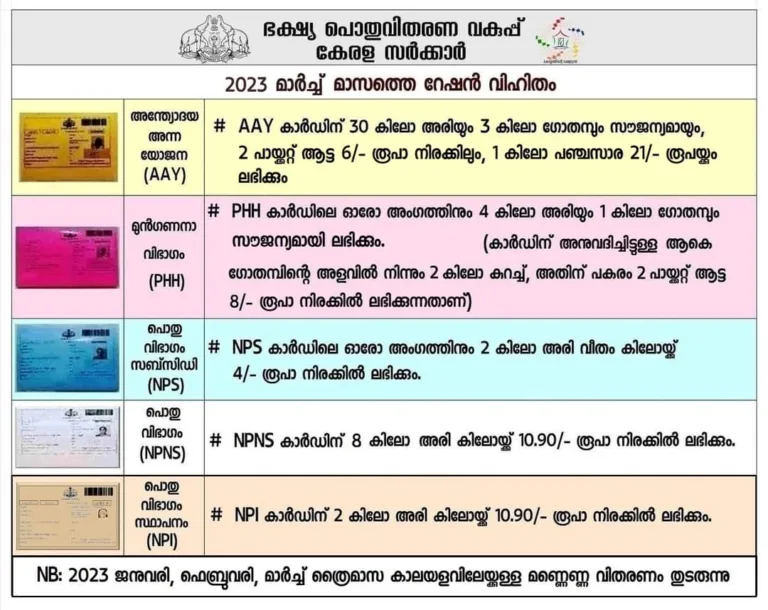
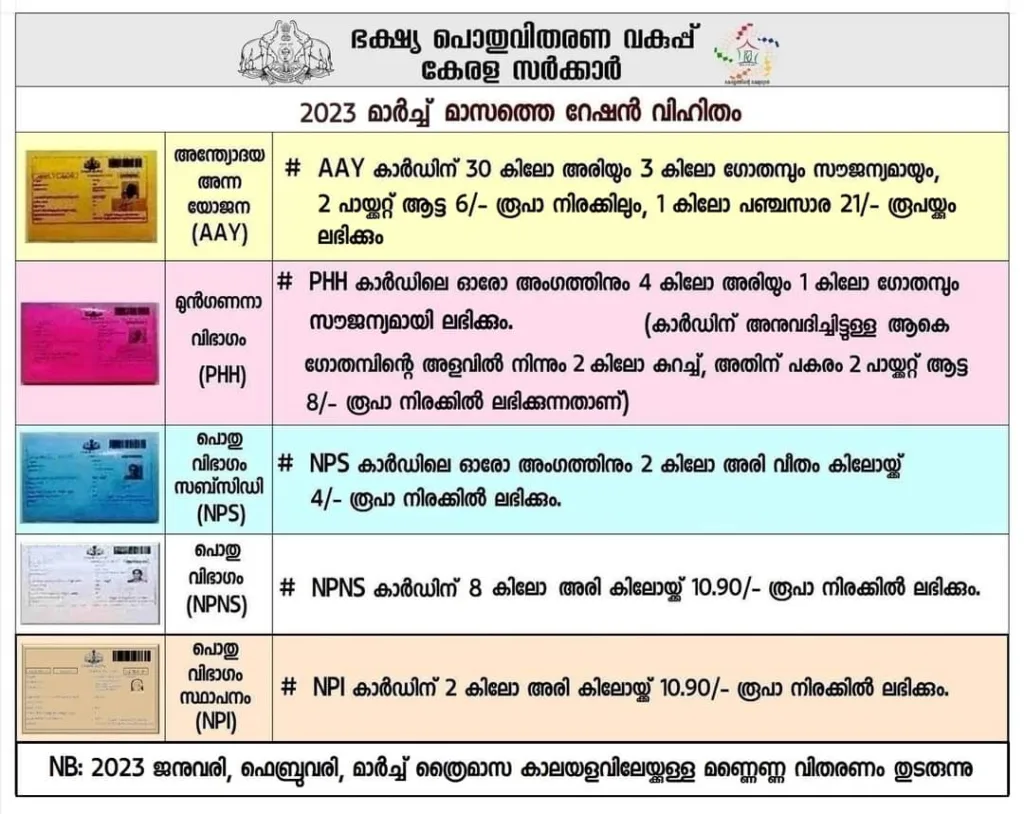
4. എല്ലാ വിഭാഗം റേഷൻ കാർഡുകൾക്കും അനുവദിച്ചിട്ടുള്ള, 2023 മാ‍ർച്ച് മാസത്തെ റേഷൻ വിഹിതം ചുവടെ…

ഓരോ റേഷൻ കാർഡിനും അനുവദിച്ചിട്ടുള്ള റേഷൻ സാധനങ്ങളുടെ അളവ് അറിയുന്നതിനായി ക്ലിക്ക് ചെയ്യുക

വാട്ട്‌സ് ആപ്പ് സന്ദേശങ്ങൾ തെറ്റിപ്പോയോ ? ഡിലീറ്റ് ചെയ്യേണ്ട; വരുന്നു തകർപ്പൻ ഫീച്ചർ

0

ലോകത്തെ തന്നെ ഏറ്റവും പ്രചാരമേറിയ ഇൻസ്റ്റന്റ് മെസേജിംഗ് ആപ്പാണ് വാട്ട്‌സ് ആപ്പ്. ലോകമെമ്പാടും 2 ബില്യൺ ഉപഭോക്താക്കളാണ് വാട്ട്‌സ് ആപ്പിന് ഉള്ളത്. ഏറ്റവും കൂടുതൽ ഫീച്ചറുകൾ അവതരിപ്പിച്ച് അപ്‌ഡേറ്റ്‌സ് നൽകുന്ന ആപ്പും വാട്ട്‌സ് ആപ്പ് തന്നെയാണ്.

ഇപ്പോഴിതാ വാട്ട്‌സ് ആപ്പ് ലോകം കാത്തിരുന്ന ഒരു ഫീച്ചറിന്റെ പണിപ്പുരയിലാണെന്നാണ് പുറത്ത് വരുന്ന റിപ്പോർട്ടുകൾ സൂചിപ്പിക്കുന്നത്. വാട്ട്‌സ് ആപ്പിൽ മെസേജ് അയക്കുമ്പോൾ ചിലപ്പോൾ തെറ്റുകൾ വരാറുണ്ട്. ആ മെസേജ് ഡിലീറ്റ് ചെയ്ത് പുതിയ സന്ദേശം അയക്കുന്നതാണ് നിലവിലെ രീതി. എന്നാൽ ഇനി തെറ്റിയ മെസേജുകൾ ഡിലീറ്റ് ചെയ്യാതെ എഡിറ്റ് ചെയ്യാൻ പുതിയൊരു ഓപ്ഷൻ വരികയാണ്. മെസേജുകൾ അയച്ച് 15 മിനിറ്റിനകം തന്നെ എഡിറ്റ് ചെയ്യാൻ സാധിക്കും. ഈ സമയപരിധി കടന്നാൽ പിന്നെ എഡിറ്റ് ചെയ്യാൻ സാധിക്കില്ല.

ആപ്പിളിന്റെ ഐമെസേജ് ആപ്പിലേത് സമാനമായ എഡിറ്റ് ബട്ടനാകും വാട്ട്‌സ് ആപ്പിലും വരിക. ഇതോടെ സന്ദേശങ്ങളിലെ വിവിധ പിഴവുകൾക്ക് പരിഹാരമാവുകയാണ്. ഐഒഎസ് 23.4.0.72 ലെ വാട്ട്‌സ് ആപ്പ് ബീറ്റാ വേർഷനിൽ ആ അപ്‌ഡേറ്റ് എത്തിയിട്ടുണ്ടെന്നാണ് വിവരം. എന്ന് മുതൽ ഈ ഫീച്ചർ എല്ലാ ഉപഭോക്താക്കൾക്കും ലഭിച്ചു തുടങ്ങും എന്ന കാര്യത്തിൽ വ്യക്തത വന്നിട്ടില്ല.

ഏത് ഫോണിലും DSLR സ്റ്റൈലിൽ 4k HD വീഡിയോകൾ, ഫോട്ടോകൾ എടുക്കാൻ പറ്റിയ ഒരു നല്ല ആപ്പ്

0

DSLR HD Camera : 4K HD Camera Ultra Blur Effect

– This DSLR HD Camera : 4K HD Ultra Camera is specially designed to take high quality photos and videos. With this DSLR HD Camera : 4K HD Ultra Camera you can make amazing photos professionally. This DSLR HD Camera : 4K HD Camera is developed with special attention to satisfy users to get best HD picture quality from their device camera.

– DSLR HD Camera : 4K HD Ultra Camera allows you to take excellent photos with your smartphone’s front & back camera in high quality 4K. It’s a very fast and simple app to capture amazing moments with your front and back camera.

– DSLR HD Camera: 4K HD Camera is fully featured and completely free Camera app for Android phones and tablets. Features of this Professional Camera app are listed below.

– You can easily shoot great photos with DSLR Camera HD, high definition with faster response time, blur editor & filter effect, DSLR HD Camera : 4K HD Camera is free to download!

FEATURES
* Capture high resolution HD photos and videos 1080p.
* Accurate Face detection.
* Camera selection with Front / rear.
* Change camera and video quality and resolution.
* Video recording
* Burst mode with configurable delay.
* Select color effects, white balance, scene modes, and exposure compensation.
* You can turn off the optional shutter sound.
* Keys Adjustable volume from which you can take pictures, zoom or to change exposure compensation
* Camera functionality: scene modes, white balance, color effects, support for focus modes, exposure compensation / lock, face recognition and torch.
* Video recording that supports all resolutions including HD ultra-quality.
* Remote control: timer with optional automatic repeat mode and optional audio countdown.
* Adjustable zoom in/out keys.
* One-touch remote control and multi-touch gesture
* You can lock the landscape or portrait orientation for the desired photo or video.
* Photo effects
* Option to disable shutter sound.
* Best for front camera (selfie time!)
* Switch between front and rear camera
* HD image capture feature
* Edit your photos with blur effect editor
* Easy to change the level of blur
* Easily blur the complex parts of photo to blur
* Change the size of brush

In short, this Professional Camera app will give you the best ultra HD picture quality and you will definitely love that!
We are confident that you will like the working and features of this Professional Dslr Camera app.

Blur Editor
With this app now you can also make your photo background blur easily and professionally!

We are confident you gonna love this blur effect camera after you give it a try, so what are you waiting for…

Download the efficient working “DSLR HD Camera” Now and be ready to have some awesome pictures to impress your friends!

എയർടെൽ 5G പ്ലസ് സപ്പോർട്ട് ചെയ്യുന്ന സ്മാർട്ട് ഫോണുകൾ

0

airtel 5G plus supported devices

Airtel is headquartered in India, and it provides communications solutions to 491 million customers in 17 countries across South Asia and Africa. The company ranks amongst the top three mobile operators globally, with its networks covering over two billion people. Airtel also offers a retail portfolio of high-speed 4G/4.5G mobile broadband, Airtel Xstream Fiber that promises speeds up to 1 Gbps, and a range of enterprise solutions including secure connectivity, cloud and data center services, cyber security, IoT, Ad Tech and CPaaS (Airtel IQ).

In telecommunications, 5G is the fifth-generation technology standard for broadband cellular networks. Cellular phone companies began deploying worldwide in 2019, and 5G networks are predicted to have more than 1.7 billion subscribers by 2025, according to the GSM Association and Statistics. 5G networks are cellular networks that use small geographical cells. All 5G wireless devices in a cell are connected to the internet and telephone network by radio waves through a local antenna in the cell. The new networks have higher download speeds, eventually up to 10 gigabits per second (Gbit/s). In addition to 5G being faster than existing networks, 5G has higher bandwidth and can thus connect more different devices, improving the quality of Internet services in crowded areas. Due to the increased bandwidth, it is expected the networks will increasingly be used as general internet service providers (ISPs) for laptops and desktop computers, competing with existing ISPs such as cable internet, and also will make possible new applications in internet-of-things (IoT) and machine-to-machine areas. Cellphones with 4G capability alone are not able to use the 5G networks.

here are the supported 5G devices

realme

  • Realme 8s 5G
  • Realme X7 Max 5G
  • Realme Narzo 30pro 5G
  • Realme X7 5G
  • Realme X7pro 5G
  • Realme 8 5G
  • Realme X50 Pro
  • Realme GT 5G
  • Realme GT ME
  • Realme GT NEO 2
  • Realme 9 5G
  • Realme 9 Pro
  • Realme 9 Pro Plus
  • Realrne Narzo 30 5G
  • Realme 9 SE
  • Realme GT2
  • Realme GT 2 pro
  • Realme GT NEO3
  • Realme Narzo 50 5G
  • Realme Narzo 50 pro
  • Realme 9i GT
  • Realme GT Neo 3T
  • Realme GT Neo 3T 150w

Xiaomi

  • Xiaomi Mi 10
  • Xiaomi Mi 10i
  • Xiaomi Mi 10T
  • Xiaomi Mi 10Tpro
  • Xiaomi Mi 11 Ultra
  • Xiaomi Mi 11X Pro
  • Xiaomi Mi 11X
  • Poco M3 Pro SG
  • Poco F3 GT
  • Xiaomi Mi 11 Lite NE
  • Xiaomi Redmi Note 11T 5G
  • Xiaomi 11T Pro
  • Xiaomi 11i HyperCharge
  • Xiaomi Redmi Note 10T
  • Xiaomi Redmi Note 11 pro plus
  • Poco M4 5G
  • Poco M4 Pro 5G
  • Xiaomi 12 pro
  • Xiaomi 11i
  • Xiaomi Redmi 11 prime 5G
  • Poco F4 5G
  • Poco X4 pro
  • Xiaomi Redmi K50i

Oppo

  • Oppo Reno5G Pro
  • Oppo Reno 6
  • Oppo Reno 6 pro
  • Oppo F19 Pro Plus
  • Oppo A53 s
  • Oppo A74
  • Oppo Reno 7 Pro 5G
  • Oppo F21 Pro 5G
  • Oppo Reno7
  • Oppo Reno 8
  • Oppo Reno 8 pro
  • Oppo K10 5G
  • Oppo F21s Pro 5G

Vivo

  • vivo X50 Pro
  • vivo V20 Pro
  • vivo X60 Pro
  • vivo X60
  • vivo X60 Pro  vivo V21 5G
  • vivo V21e
  • vivo X70 Pro
  • vivo x50 Pro
  • vivo V20 Pro
  • vivo X60 Pro
  • vivo X60
  • vivo X60 Pro
  • vivo V21 5G
  • vivo V21e
  • vivo X70 Pro
  • vivo X70 Pro
  • vivo Y72 SG
  • vivo V23 SG
  • vivo V23 Pro 5G
  • vivo V23e SG
  • vivo T1 SG
  • vivo Y75 5G
  • vivo T1 PRO
  • vivo X80
  • vivo X80 pro
  • vivo V25
  • vivo V25 Pro
  • vivo Y55 SG
  • vivo Y55s 5G

iQOO

  • iQOO 3 5G
  • iQOO 7
  • iQOO 7 Legend
  • iQOO 23
  • iQOO 25 5G
  • iQOO 9 Pro
  • iQOO 9
  • iQOO 9 SE
  • iQOO 26
  • iQOO 9T

iPhone

  • iPhone 12 mini  awaiting software update
  • iPhone 12 – awaiting software update
  • iPhone 12 Pro – awaiting software update
  • iPhone 12 Pro Max – awaiting software update
  • iPhone 13 Mini – awaiting software update
  • iPhone 13 – awaiting software update
  • iPhone 13 Pro – awaiting software update
  • iPhone 13 Pro Max – awaiting software update
  • iPhone SE-2022 – awaiting software update
  • iPhone 14 – awaiting software update
  • iPhone 14 Plus – awaiting software update
  •  iPhone 14 Pro – awaiting software update
  • iPhone 14 Pro Max – awaiting software update

OnePlus

  • OnePlus Nord
  • OnePlus 9
  • OnePlus 9pro
  • OnePlus Nord CE
  • OnePlus Nord CE 2
  • OnePlus 10 PRO SG
  • OnePlus Nord CE Lite 2
  • OnePlus 10R
  • OnePlus Nord
  •  OnePlus Nord 2T
  • OnePlus 10T
  • OnePlus 9RT
  • OnePlus 8 – awaiting software update
  • OnePlus 8T – awaiting software update
  • OnePlus 8 Pro – awaiting software update
  • OnePlus Nord 2 – awaiting software update
  • OnePlus 9R – awaiting software update

Samsung

  • Samsung Galaxy A53 5G
  • Samsung A33 5G
  • Samsung Galaxy 521 FE
  • Samsung Galaxy 522 Ultra
  • Samsung Galaxy M33
  • Samsung Flip4
  • Samsung Galaxy 522
  • Samsung Fold4
  • Samsung Galaxy Note 20 Ultra – awaiting software update
  • Samsung Galaxy 521 – awaiting software update
  • Samsung Galaxy S21 Plus – awaiting software update
  • Samsung Galaxy 521 Ultra – awaiting software update
  • Samsung Galaxy Z fold 2 – awaiting software update
  • Samsung F42 (E426B) – awaiting software update
  • Samsung A52s (A528B) -awaiting software update
  • Samsung M52 (M526B) – awaiting software update
  • Samsung Flip3 – awaiting software update
  • Samsung Fold3 – awaiting software update
  • Samsung A22 SG – awaiting software update
  • Samsung 520FE 5G – awaiting software update
  • Samsung M32 SG – awaiting software update
  • Samsung F23 – awaiting software update
  • Samsung A73 – awaiting software update
  • Samsung M42 – awaiting software update
  • Samsung M53 – awaiting software update
  • Samsung M13 – awaiting software update